
Inside a Laptop: Understanding the Hardware Parts That Power Your Computer
A laptop may look like a single compact device, but inside its slim body are many hardware components working together. Understanding these parts can help students, technicians, and DIY enthusiasts learn how a laptop functions and identify common hardware problems.
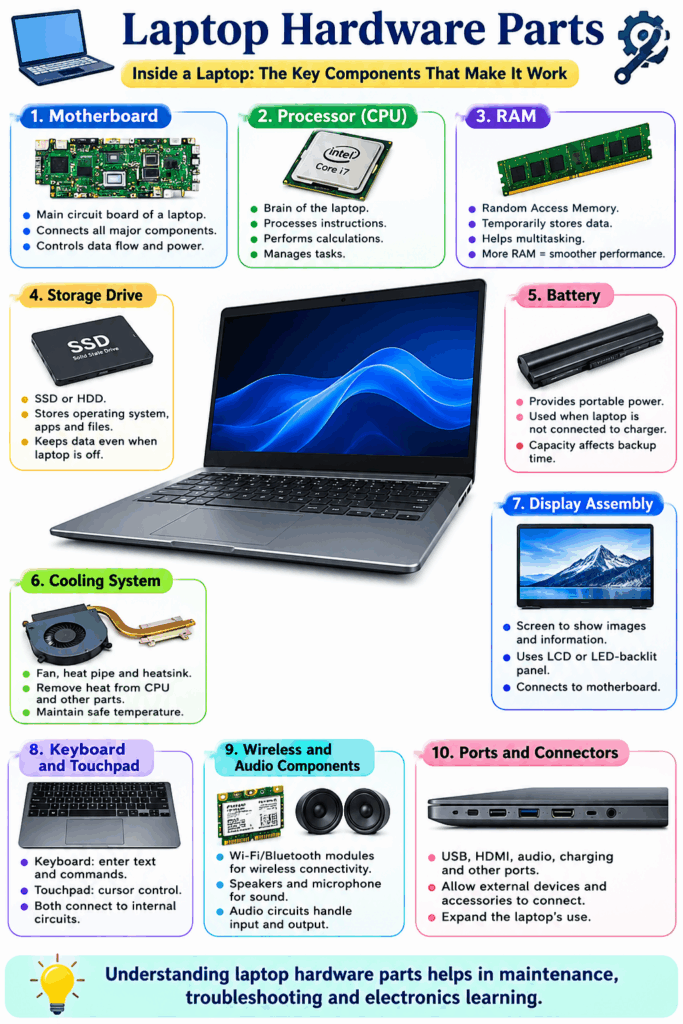
1. Motherboard
The motherboard is the main circuit board of a laptop. It connects major components such as the processor, memory, storage, display, keyboard, USB ports, and other circuits.
2. Processor (CPU)
The CPU is often called the “brain” of the laptop. It processes instructions, performs calculations, and manages tasks. A faster and more efficient processor can improve overall performance.
3. RAM
Random Access Memory (RAM) temporarily stores data that the laptop is actively using. More RAM can help a computer handle multiple applications and tasks more smoothly.
4. Storage Drive
Laptops generally use an SSD or, in older models, an HDD. The storage drive keeps the operating system, applications, documents, photos, and other files even when the laptop is switched off.
5. Battery
The battery provides portable power when the laptop is not connected to a charger. Its capacity and condition directly affect how long the laptop can operate away from a power outlet.
6. Cooling System
A cooling system usually includes a fan, heat pipe, and heatsink. These components remove heat generated by the CPU and other components, helping maintain safe operating temperatures.
7. Display Assembly
The screen displays images and information. Depending on the model, it may use an LCD or LED-backlit panel and connects to the motherboard through a display cable.
8. Keyboard and Touchpad
The keyboard allows users to enter text and commands, while the touchpad provides cursor control. Both connect to the laptop’s internal circuitry.
9. Wireless and Audio Components
Wi-Fi/Bluetooth modules provide wireless connectivity, while speakers, microphones, and audio circuits handle sound input and output.
10. Ports and Connectors
USB, HDMI, audio, charging, and other ports allow external devices and accessories to connect with the laptop.
Understanding these hardware parts provides a useful foundation for laptop maintenance, troubleshooting, and electronics learning.