
The Ultimate Lenovo Laptop Parts List for Beginners & Professionals focuses on genuine/OEM replacement and upgrade parts for popular series (ThinkPad, IdeaPad, Yoga, Legion, ThinkBook, LOQ, etc.).
Parts are highly model-specific—always verify compatibility using your exact Machine Type (MT), serial number, or FRU/part number.
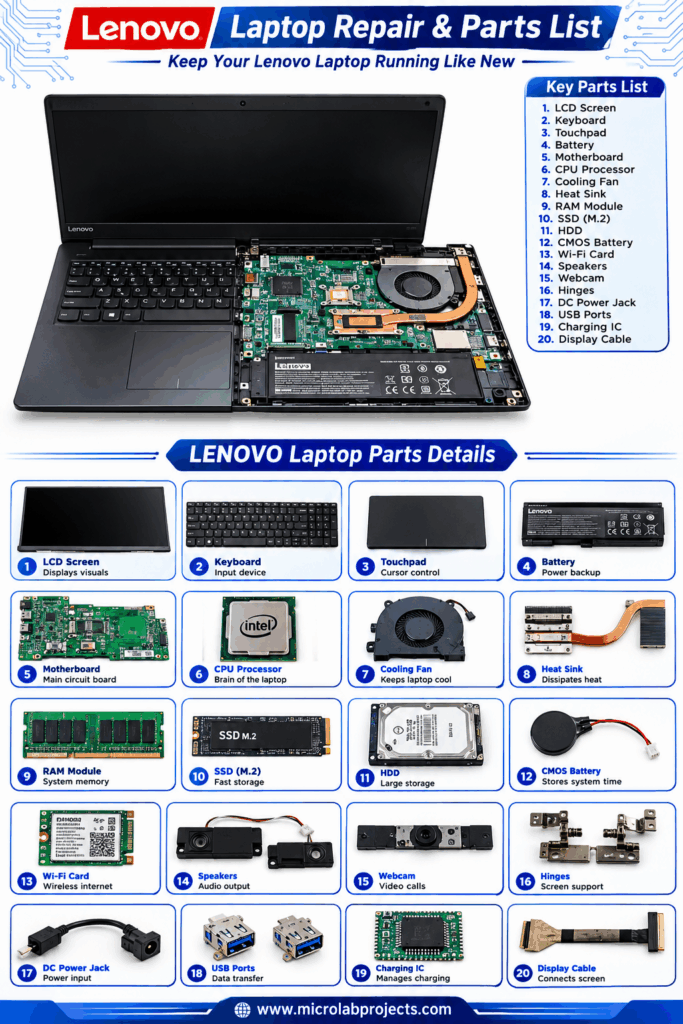
How to Identify and Order the Correct Parts
- Locate your model info: Check the bottom case sticker, BIOS, or Lenovo Vantage for the Machine Type (e.g., 20VH, 82JW) and serial number.
- Use Lenovo’s official Parts Lookup tool: Enter serial number (for exact installed parts) or model/Machine Type (for compatible options) at support.lenovo.com (Parts Lookup / parts-lookup pages).
- Download the Hardware Maintenance Manual (HMM) or Self-Repair Guide for your model from Lenovo Support—these list FRU numbers, screw maps, and step-by-step procedures.
- Prefer genuine Lenovo parts for warranty, fit, and reliability. Third-party options exist but vary in quality.
- Tools typically needed: Phillips screwdriver set, plastic pry tools, anti-static precautions. Many ThinkPads score highly for repairability (easy battery, keyboard, storage/memory access on recent models).
CRU vs. FRU:
- CRU (Customer Replaceable Unit): User-serviceable (self-service or optional-service). Examples often include memory, storage, battery, keyboard on many models. Replacing these usually does not void warranty if done carefully.
- FRU (Field Replaceable Unit): Typically requires trained technicians (e.g., motherboard, some displays). Self-replacement can affect warranty.
Core Parts Categories
1. Battery (Internal or External)
Most modern Lenovo laptops use internal batteries accessed by removing the bottom cover. Capacities commonly range 45–80+ Wh depending on series (higher for Legion gaming).
- Look for FRU/model numbers printed on the battery (e.g., L19M3PD5, 5B10W13930, 45N1127 series for older ThinkPads).
- Common across ThinkPad T/X/L/P, IdeaPad, Legion.
- Tip: Match voltage, capacity, and connector. Lenovo batteries are preferred for safety and longevity.
2. Keyboard / Palmrest / Top Cover Assembly
ThinkPads are renowned for excellent keyboards; many recent models allow relatively straightforward replacement (best-in-class on some T/L series). Layout (language, backlit, fingerprint reader) and chassis color must match. Often sold as full upper case assemblies on consumer models.
3. Display / LCD Screen / Panel / Bezel / Cover
Sizes: 13–17+ inches. Resolutions: HD, FHD, QHD, 4K; panel types: IPS, OLED; touch/non-touch.
- Match exact resolution, connector type (eDP), brightness, and mounting.
- Full assemblies (panel + bezel + hinges) simplify replacement on many models. Hinges and LCD covers are separate FRUs.
- High demand on IdeaPad, Yoga (2-in-1), and Legion.
4. Memory (RAM)
- Upgradeable models (many ThinkPad T/L/P, some Legion/IdeaPad): DDR4 or DDR5 SO-DIMM slots (often 1–2). Max capacity frequently 32–64 GB+.
- Non-upgradeable: Soldered LPDDR (common on thin X1 Carbon, some Yoga/Slim models).
- Check speed (e.g., DDR5-5600), dual-channel preference, and supported max in HMM/PSREF.
5. Storage (SSD / HDD)
- Primary: M.2 NVMe (2280 most common; sometimes 2242 on thinner models). PCIe Gen 3/4.
- Secondary: 2.5-inch SATA on larger/older models, or additional M.2.
- Caddies/brackets often needed. Easy CRU on many ThinkPads and Legion.
6. Motherboard / System Board (Planar)
Model- and CPU-specific (Intel/AMD generations). Includes or pairs with I/O boards, PMIC, etc. Highest-cost FRU; match exact part number carefully.
7. Cooling System (Fan + Heatsink)
CPU/GPU fans and heat pipes. Gaming Legion models often have more complex dual-fan setups. Clean regularly; replace if noisy or failing. Some designs allow fan replacement separate from the heatsink.
8. Power Components
- AC Adapter / Charger: Wattage must match or exceed (e.g., 65W USB-C PD common on business; 135–300W+ barrel or USB-C on Legion). Genuine preferred.
- Power jack / DC-in board / cable.
- Power cord.
9. Wireless / Connectivity
- Wi-Fi / Bluetooth card (M.2, often Intel or Qualcomm; some soldered).
- WWAN (cellular) module where supported.
- Antennas (in LCD cover).
10. Chassis / Structural
- Bottom case / base cover.
- Hinges.
- Speakers, touchpad, webcam/camera module, fingerprint reader.
- I/O boards / daughterboards (USB, Thunderbolt ports—modular on some newer ThinkPads for easier repair).
11. Other Common Parts
- Optical drive (rare on modern models).
- CMOS battery.
- Thermal paste (for CPU/GPU reapplication during cooling work).
- Screws (model-specific kits exist).
Series-Specific Notes
- ThinkPad (T, X, L, P, E series): Generally most repairable/upgradeable. Excellent HMM support and high iFixit-style scores on recent gens (easy battery, keyboard, RAM/SSD). Business-focused.
- IdeaPad / Yoga / Slim: More consumer-oriented; some thinner models have soldered RAM and tighter construction. Self-repair guides available for many.
- Legion / LOQ (Gaming): Higher-power cooling, larger batteries, discrete GPU considerations. Good parts availability for fans, keyboards, screens.
- Older models may still have extensive aftermarket support (e.g., specific battery FRUs).
Tips for Beginners
- Start with CRUs (battery, RAM, SSD, keyboard where accessible).
- Watch model-specific YouTube teardowns or use official self-repair guides.
- Back up data and discharge static.
- Check warranty status first (self-repair of CRUs is usually fine).
Tips for Professionals / Advanced Users
- Stock common FRUs by series.
- Use PSREF for official specs.
- Consider donor machines for rare parts.
- Thermal repasting and undervolting common on Legion/ThinkPad P.
- Modular designs (e.g., separate port boards on some newer ThinkPads) reduce repair costs.
Where to Buy
- Official: Lenovo Parts Lookup / Support store (genuine, with availability and pricing).
- Authorized: iFixit (select genuine parts + guides), Micro Center, specialized laptop parts sites (GotLaptopParts, etc.).
- Always cross-check FRU numbers.
This list covers the vast majority of replacement and upgrade needs. For any specific model, enter the Machine Type or serial into Lenovo’s Parts Lookup for the definitive, current FRU list and availability. Self-repair guides continue to expand across IdeaPad, Legion, ThinkPad, Yoga, and related lines. Always prioritize safety and compatibility.