
Tiny Connector, Big Impact: Understanding Mobile Phone Micro USB Connectors for Successful Repairs
Although USB Type-C has become common in newer smartphones, millions of Android devices still use Micro USB connectors for charging, data transfer, and device communication.
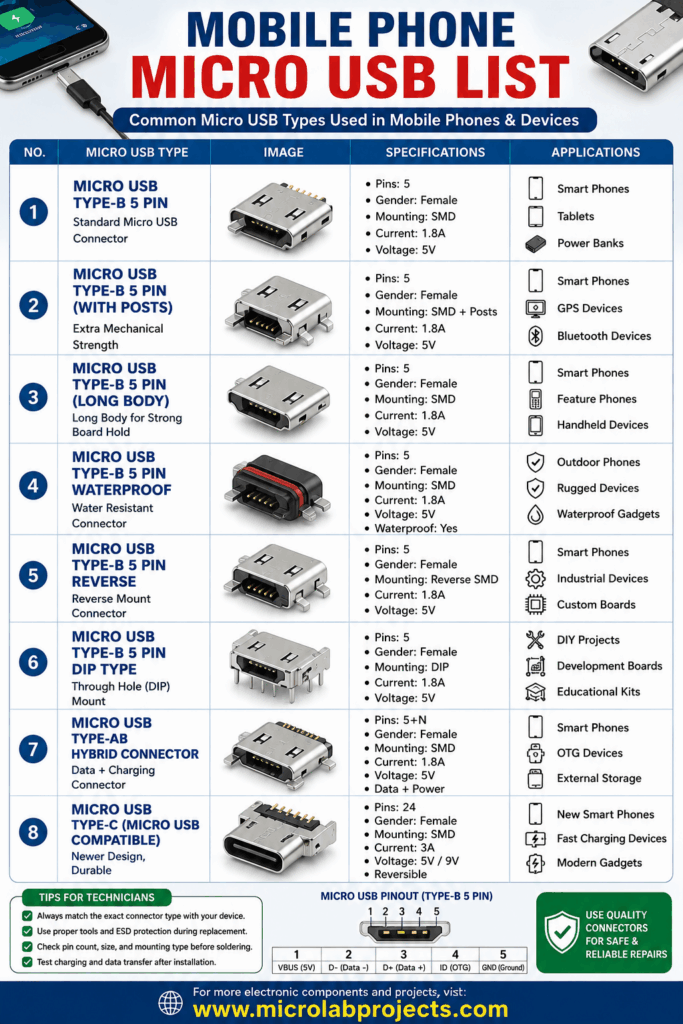
For mobile repair technicians, understanding the different Micro USB connector types is essential for diagnosing charging faults, restoring data connectivity, and performing durable motherboard repairs.
High-Value SMD Mobile Components: Essential Parts Every Mobile Repair Technician Should Know
A standard Micro USB connector consists of five pins that handle power, ground, data transmission, and device identification. These connectors are commonly soldered directly onto the motherboard using Surface Mount Device (SMD) technology. Because they experience frequent plugging and unplugging, Micro USB ports are among the most commonly replaced smartphone components.
Several Micro USB connector variations are available. Standard 5-pin connectors are widely used in older Samsung, Motorola, HTC, LG, Huawei, and budget Android phones. Reinforced connectors include additional mounting legs for improved mechanical strength, reducing the chance of the port separating from the motherboard.
Waterproof versions feature protective seals that help resist moisture in rugged devices. Through-hole (DIP) connectors provide stronger board attachment for specific applications, while reverse-mount designs are used in compact smartphone layouts.
Samsung Android Mobile Batteries: A Complete Guide for Mobile Repair Technicians
Common symptoms of a damaged Micro USB connector include slow charging, intermittent charging, failure to detect USB cables, loose cable fit, inability to transfer data, or complete charging failure. Before replacing the connector, technicians should inspect the charging cable, battery condition, charging IC, fuse, and nearby PCB traces to ensure the connector is truly the source of the problem.
Professional replacement requires precision tools such as a hot-air rework station, temperature-controlled soldering iron, flux, solder wick, precision tweezers, microscope, and ESD-safe workstation. During installation, technicians should carefully align all five pins and securely solder the mechanical anchor points to maximize durability. After repair, charging speed, USB communication, and connector stability should be thoroughly tested.
Using high-quality replacement connectors that match the original footprint significantly improves repair reliability and customer satisfaction. Proper cleaning of solder pads, careful inspection for lifted traces, and accurate soldering techniques help prevent future failures.
Mastering Micro USB connector identification and replacement remains an important skill for every mobile repair professional. Even as technology evolves, these small connectors continue to power millions of devices worldwide, making them a valuable area of expertise for technicians and electronics enthusiasts alike.
#MobileRepair #MicroUSB #ChargingPort #AndroidRepair #ElectronicsRepair #PCBRepair #Microsoldering #SmartphoneRepair #RepairTechnician #TechEducation